
Download RandomSeed – AI‑Powered Image Customization Tool
Overview
RandomSeed is a cloud‑first AI image generator that brings the full power of Stable Diffusion to any device with a modern web browser. By leveraging the Effortless StableDiffusion API, the platform eliminates the need for a dedicated GPU, complex driver installations, or bulky desktop software. Users simply log in, select a model from integrated repositories such as Civitai or HuggingFace, type a descriptive prompt, and watch the AI craft a high‑resolution picture in seconds.
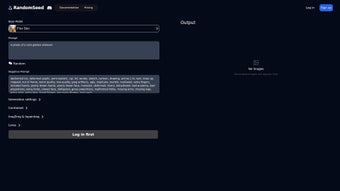
The interface is built around intuitive sliders for image count, inference steps, and guidance scale, allowing creators to fine‑tune the trade‑off between speed and detail. Advanced controls—including Control‑Net, mask editing, Img2Img, and Inpainting—give professional artists precise command over composition, texture, and style. Because all processing occurs on secure, GDPR‑compliant servers, data is encrypted in transit and automatically purged after 24 hours unless saved to a user account.
Whether you are a freelance designer needing quick mock‑ups, a marketer producing eye‑catching social graphics, or a game studio generating concept art at scale, RandomSeed delivers a free‑tier entry point with 20 daily generations and affordable premium plans for heavy users. The service is continuously updated with the latest diffusion models, ensuring that the tool remains on the cutting edge of AI‑driven creativity while remaining safe, fast, and accessible from Windows, macOS, Linux, Android, or iOS.
Key Features, Pros & Cons
- One‑click model loading: Instantly access thousands of pre‑trained models from Civitai and HuggingFace without manual downloads.
- Prompt‑driven generation: Turn simple text descriptions into photorealistic or stylized images using state‑of‑the‑art diffusion.
- Adjustable parameters: Fine‑tune image count, inference steps, and guidance scale for optimal speed‑detail balance.
- Multiple samplers: Choose Euler for quick results, DPM2 for smoother gradients, or other samplers for unique artistic flair.
- Control‑Net & mask tools: Guide the diffusion process with pose maps, edge maps, or custom masks for pinpoint accuracy.
- Img2Img & Inpainting: Transform existing pictures or seamlessly fill missing regions while preserving style.
- Real‑time preview & upscaling: Low‑resolution drafts appear instantly; a single click upgrades to full‑resolution output.
- Cloud‑based processing: No local hardware required; all heavy lifting is performed on secure, scalable servers.
- Automatic versioned updates: New models and API enhancements are deployed without user intervention.
- Flexible export options: Download results in PNG, JPEG, or WebP, or push directly to Google Drive, Dropbox, and other cloud services.
Pros
- Runs on any modern browser – no installation or GPU needed.
- Extensive library of ready‑to‑use models with one‑click loading.
- Granular control over generation parameters for both speed and quality.
- Advanced features (Control‑Net, Img2Img, Inpainting) are available in the free tier.
- Secure, GDPR‑compliant cloud environment with regular automatic updates.
Cons
- Free tier limits daily generations; power users must upgrade to a paid plan.
- Performance depends on internet bandwidth and server load.
- High‑resolution models may experience longer queues during peak times.
- No offline mode – the service is unavailable without an internet connection.
- Premium custom model upload is restricted to paid subscribers.
Installation, Usage Instructions & Compatibility
Because RandomSeed is entirely web‑based, there is no traditional software installation. Getting started takes just a few minutes:
- Create an account: Visit RandomSeed, click “Sign Up,” verify your email, and you’ll receive 20 free image generations each day.
- Select a model: In the dashboard, choose “Load Model” and browse the built‑in Civitai or HuggingFace catalogs. Popular choices include “Stable Diffusion 2.1” for photorealism and “Anime Diffusion” for stylized artwork.
- Enter your prompt: Write a clear, descriptive sentence. Include adjectives for lighting, mood, and perspective to guide the AI effectively.
- Configure parameters: Adjust the sliders for Number of Images (1‑8), Inference Steps (20‑100), and Guidance Scale (7‑15). Higher steps yield more detail at the cost of longer render times.
- Pick a sampler: Euler offers a balanced speed‑quality ratio, while DPM2 delivers smoother gradients for high‑detail work.
- Optional advanced controls: Upload a mask or enable Control‑Net to constrain the diffusion, use Img2Img to modify an existing picture, or apply Inpainting to fill gaps.
- Generate & preview: Click “Create.” Low‑resolution previews appear within seconds; refine settings as needed.
- Upscale & download: When satisfied, press “Upscale & Download.” Choose PNG, JPEG, or WebP, or send the file directly to your preferred cloud storage.
Compatibility: RandomSeed runs on any device with a recent version of Chrome, Edge, Firefox, or Safari. Supported operating systems include Windows, macOS, Linux, Android, and iOS, making it a truly cross‑platform solution for designers on the go.
For developers, RandomSeed also offers an API key that can be integrated into custom scripts, enabling batch generation and automation within existing design pipelines.
Frequently Asked Questions
Is RandomSeed free to use?
RandomSeed provides a generous free tier with up to 20 image generations per day. Unlimited usage is available through premium plans starting at $9.99 per month.
Which operating systems does RandomSeed support?
Because it runs entirely in the browser, RandomSeed works on Windows, macOS, Linux, Android, and iOS as long as you use a recent version of Chrome, Edge, Firefox, or Safari.
Can I upload my own custom diffusion model?
Yes. Premium subscribers can upload .ckpt or .safetensors files via the “Custom Model” tab, allowing you to run proprietary or experimental models directly in the web UI.
How does the Control‑Net feature improve my results?
Control‑Net lets you feed a guiding image—such as a pose map, edge map, or segmentation mask—into the diffusion process. The AI then respects those structural cues while applying the chosen style, giving you fine‑grained control over composition without sacrificing creativity.
Is my data safe on RandomSeed’s servers?
RandomSeed follows GDPR‑compliant policies. All uploads and prompts are encrypted in transit, stored temporarily, and automatically deleted after 24 hours unless you explicitly save them to your account or a linked cloud service.
Conclusion & Call to Action
RandomSeed bridges the gap between cutting‑edge diffusion AI and everyday creators by offering a secure, cloud‑based platform that requires no installation, no powerful GPU, and works on any device. Its extensive model library, granular parameter controls, and advanced features such as Control‑Net, Img2Img, and Inpainting make it suitable for quick mock‑ups, detailed concept art, and bulk image generation alike. The free tier lowers the barrier to entry, while the affordable premium plans provide higher limits, custom model support, and priority processing for professionals.
Ready to elevate your visual workflow? Sign up for a free account today and start generating high‑quality images in seconds. If you need more daily generations, custom model capability, or faster queue priority, consider upgrading to the premium plan—your creative projects will thank you.



.png)



